How are the social distancing measures affecting you? Businesses are not operating as they used to before the pandemic, and workers and customers have to adhere to the set regulations to keep them safe. Enterprises are now relying on the internet to carry on their business. Live-Streaming from home is the best idea for live meetings and social events. Here are gears and tips that your entity can use for more professional live streams.
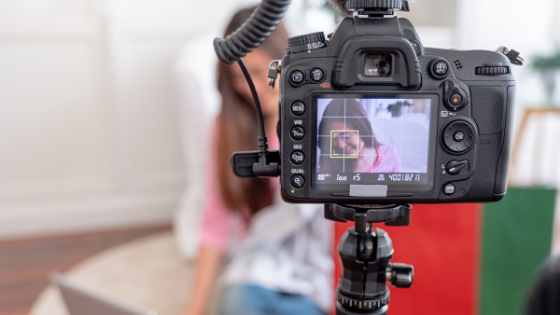
Professional Streaming Equipment
Most online visitors hardly ignore appealing videos uploaded on company websites. As such, the reputation of your business is put on the line when live streaming. Find the right gear to produce high-quality videos to protect the name and image of your organization. For the best outcome, get professional live streaming tools. Also, use a high definition camera to shoot high resolutions clips.
Rent professional streaming equipment to save money and enhance professionalism in your videos. Hire or buy recording devices to capture recordings and an extra screen for your office work. When setting up the workstation at home, get an external webcam to communicate directly with virtual guests before and after going live. To maintain the right posture and avoid interruptions during the production process, have a wireless remote.
Get a Professional Video Host
Streaming videos on social media is a great step, but not right for professional live streams. Acquire a professional hosting channel for your business clips. These platforms allow companies to live stream content from their sites. Besides, a professional host is great for your organization due to increased traffic to your website. With a professional host, you can make exclusive videos where your online audience can find them on your company site.
Run Tests on the Equipment
Going live once the devices have been connected is a big mistake. Video buffering for long will make your viewers lose interest and move on to watching other clips. Therefore, test your setup to void technical problems that might occur when you are live streaming from home. Check whether all streaming devices are working faultlessly during a test run.
Create another live stream and start inviting your employees to tune in. Use different video settings quality to check for any issue with the live stream. The test run ought to be repeated at least three times to remove bugs. Give your audience a chance to rate your live stream. Also, use these opinions to improve areas that need correction to have a worthwhile experience with professional equipment.
Get a Backup Plan
Live streaming involves various components working together. However, something might get out of hand when filming your actual event. It would help if you had a backup plan for your video. Choose a professional video hosting channel that has a backup stream link. In case the current link goes offline, you are automatically switched to the backup to continue with your live broadcast.
Live Streaming – Tips and Tactics
When filming a professional clip, your background is important. Work on making your background livelier to attract the virtual audience. Use props that relate to your topic or match your industry in the background. Signs and pictures in the background draw viewers to the live stream. Put on official suits to maintain a professional look on the screens. Moreover, the shooting room should be quiet with no traffic from pets and people. For more tips for a professional live stream click here.
Deliver Quality Content
Online viewers go for live streams that add value. Professionals must produce high-quality content to remain relevant to their audience. If you specialize in a particular field, carry out some research to determine what the market wants.
Most search engine tools have details of commonly asked queries related to your entity. Write scripts to help answer these questions. Talk to other experts about the queries to get more expert opinions. Understand everything about the topic you are planning to cover to avoid a case of unanswered questions. It is easy to get the attention of online viewers with quality content.
Interact with Viewers
Your viewers should be part of your live stream. Plan for it such that you have different sessions. Use the question and answer session to connect with the audience. Acknowledge all questions before answering them. The session helps you to know the number of people following your live stream. Also, engaging the audience breaks the monotony of only one person talking.
Creating professional live streams should be a continuous process. Use any mishap you experience as a learning tool to better your live videos. Make use of the latest developments to keep up with changes in this industry. To increase and maintain your website traffic, give your online audience high-quality content.


Leave a Reply